Verified capability suitable for normal customer operations.
Purpose
Approvals is where compliance managers and analysts resolve screening hits, policy holds, and escalation items. Every decision should answer: what happened, can I act, and what is my evidence.
What you see on the queue
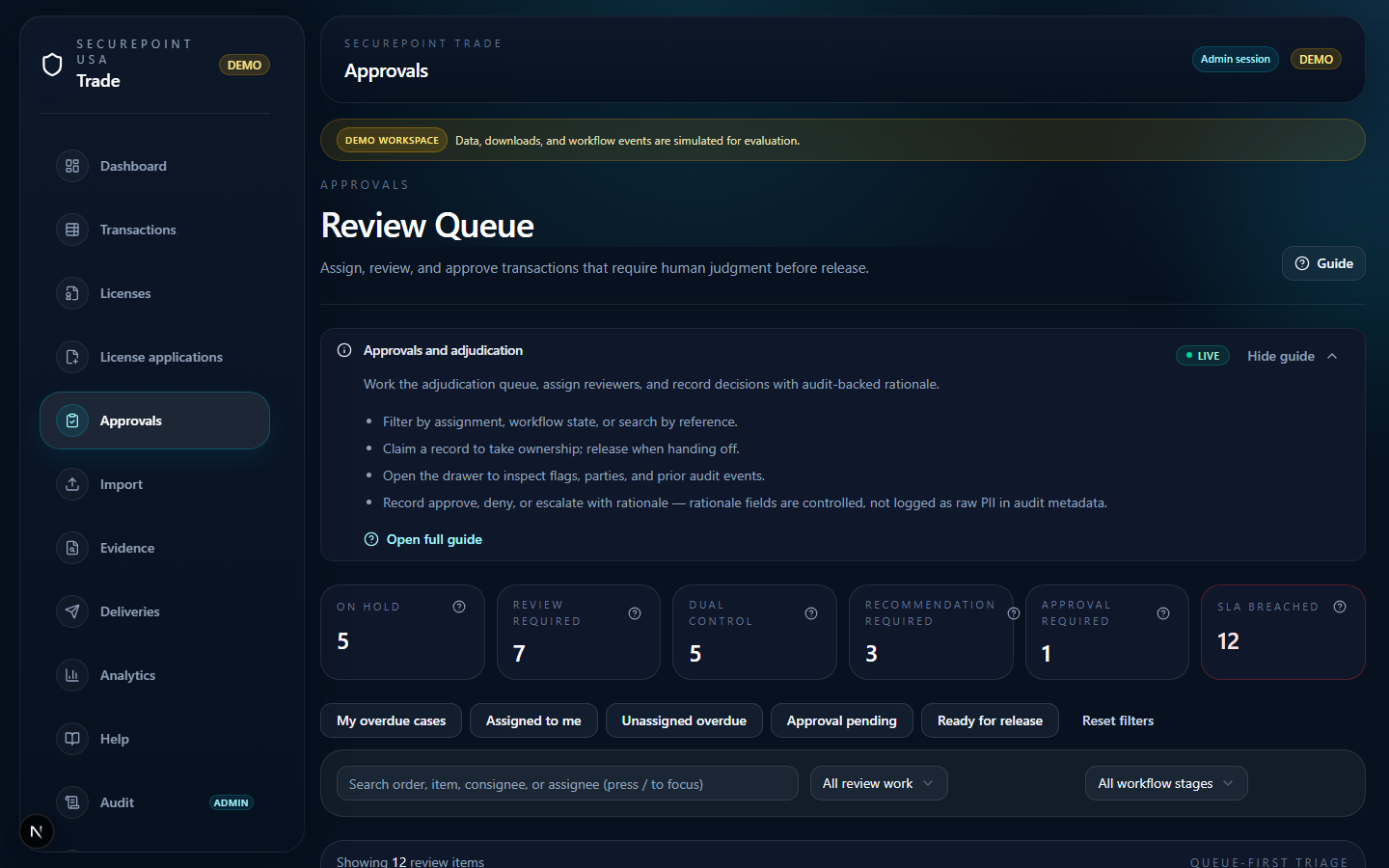
The Review Queue is your daily working surface. The callouts on the figure below name the four areas you use first — sidebar, header, filter chips, and per-row claim action.
- Sidebar — Approvals is selected; this is the workspace you live in as a reviewer.
- Review queue header — page heading plus optional KPI strip showing queue pressure.
- Filter and state controls — narrow by workflow state, assignee, or reference search; defaults to your assigned items.
- Claim / decision action — per-row affordance to take ownership, then open the drawer for approve, deny, or escalate.
- Sidebar — Approvals selected
- Review queue header
- Filter and state controls
- Claim / decision action
Working a record end to end
- Claim — take ownership before reviewing so two reviewers do not double-handle the same item.
- Open inspector drawer — inspect flags, parties, screening detail, and prior audit events without leaving the queue.
- Decide — record approve, deny, or escalate. Rationale field is controlled and feeds the audit row, never raw PII.
- Release if needed — handing off to another reviewer drops your claim cleanly; the audit row records the handoff.
Keyboard shortcuts
Press ? in the approvals workspace for the full shortcut list. The most-used: / focuses search, j and k move selection, Enter opens the inspector, c claims, r releases, o opens the transaction in a new tab.
Role expectations
Analysts prepare and recommend; managers and admins approve or deny. Viewers can read queue state but cannot change decisions. If actions are missing on a row, confirm your role assignment with an org admin — Trade fails closed when permission is absent rather than silently allowing the action.
What the audit row captures
Every decision writes an append-only audit row scoped to your organization. The row records actor, decision, rationale field reference, and timestamp — metadata only. Raw party names and screening payloads stay out of the audit metadata by design; the rationale lives in a structured field, not a free-text PII drop.
Related guides
Related workspaces
Extended operator documentation: docs/user-guides/approvals-workflow.md in the Trade repository (for administrators and implementers).